Notice
Recent Posts
Recent Comments
Link
| 일 | 월 | 화 | 수 | 목 | 금 | 토 |
|---|---|---|---|---|---|---|
| 1 | 2 | 3 | 4 | |||
| 5 | 6 | 7 | 8 | 9 | 10 | 11 |
| 12 | 13 | 14 | 15 | 16 | 17 | 18 |
| 19 | 20 | 21 | 22 | 23 | 24 | 25 |
| 26 | 27 | 28 | 29 | 30 |
Tags
- 그래프데이터베이스
- 오라클LANG
- how to DPI-1047
- neo4j
- 오라클 물음표
- oracle ????
- HackerrankSQL
- TigerGraph
- 타이거그래프
- hackerranckSQL
- neo4j자격증
- 오라클???출력
- dpi-1072 version is unsupported windows
- graphDB
- how to DPI-1072
- 오라클한글깨짐
- cx_oracle python oracle error
- neo4jcertificate
- Tigergraph GSQL
- GSQL
- oracle printed ????
- cx_oracle 에러
- hackerrankTypeofTrianglesolution
- DPI-1047
- GSQL101
- neo4jcypher
- hackerrankTypeofTriangle
- hackerrank
- SQL연습
- DPI-1072
Archives
- Today
- Total
song's note
[python] strip(), rstrip(), lstrip() 함수 본문
strip 함수를 이용하면 문자열에서 원하는 문자를 제거할 수 있다.
strip, rstrip, lstrip 세 가지가 있는데,
strip(): 주어진 문자를 문자열의 왼쪽과 오른쪽에서 제거
rstrip(): 주어진 문자를 문자열의 왼쪽에서 제거
lstrip(): 주어진 문자를 문자열의 오른쪽에서 제거
※괄호 안에 문자를 주지 않으면 공백을 제거함
아래의 예시를 보면,
sample = " 11234 Hello 43211 "

print("'"+ sample.strip() +"'")
print("'"+ sample.lstrip() +"'")
print("'"+ sample.rstrip() +"'")
문자열 좌우로 공백이 있다.
(strip 함수 전 후로 ' 를 붙여서 출력했다.)
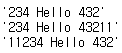
위 코드를 실행하게 되면, 아래와 같은 결과를 얻게 된다.
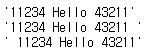
아래 코드를 실행하면, 변화가 없다. 왜일까 ?
print("'"+ sample.strip('1') +"'")
print("'"+ sample.lstrip('1') +"'")
print("'"+ sample.rstrip('1') +"'")
좌우 제일 바깥쪽 문자가 공백이기 때문에 (≠ '1')
예상과는 달리 '1' 이 제거되지 않는다.
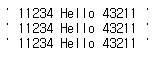
sample 문자열을 살짝 바꿔서 실행하면
'1'을 제거하고 출력할 수 있다.
sample = "11234 Hello 43211"
print("'"+ sample.strip('1') +"'")
print("'"+ sample.lstrip('1') +"'")
print("'"+ sample.rstrip('1') +"'")